Showing posts with label icon. Show all posts
Showing posts with label icon. Show all posts
Friday, June 2, 2017
Disable Chromes Notification bell icon from notification area
Disable Chromes Notification bell icon from notification area
Chrome users may noticed that when they are using Chrome browser in notification area bell icon appears. So there are a way to disable that bell icon, and disappear from notification area.
1. Open Chrome browser and type in chrome://flags and hit enter.
2. Now use Ctrl+F keyboard combination to open search box in Chrome.
3. Search for Enable Rich Notifications and from drop down menu select Disabled.
But in latest version of Chrome there are no Enable Rich Notifications function.
If you cant find any result from that, then try to find next Enable Google Now notifications support and Enable experimental Synchronized Notifications and select both to Disabled.
Now after that all, at bottom of left side press on the Relaunch Now button.
After Chrome restarted, all settings given from you will be appeared.

Friday, April 7, 2017
Displaying Trash Computer Home and Network icon on Ubuntu Desktop
Displaying Trash Computer Home and Network icon on Ubuntu Desktop
gconf-editor
First open the terminal window from (Applications -> Accessories -> Terminal ) and type in the following command to launch gconf-editor :
gconf-editor
You will get a window like this :
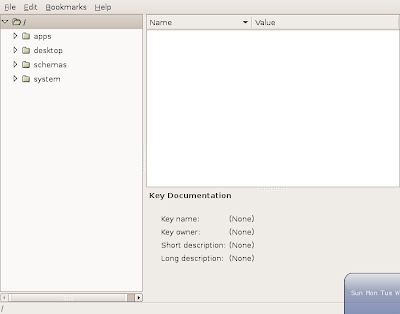
Now on the left side of the Pane in the window expand apps , inside apps expand nautilus and chose desktop (apps -> nautilus -> desktop )you will get a window like this :
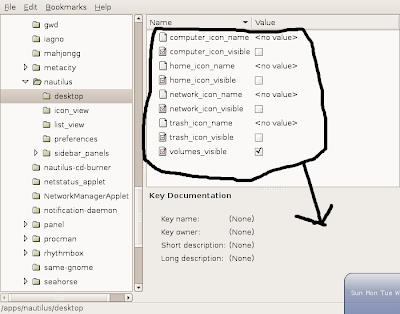 In this window enable "computer_icon_visible" , "home_icon_visible" , "network_icon_visible" and "trash_icon_visible" your window should look like this :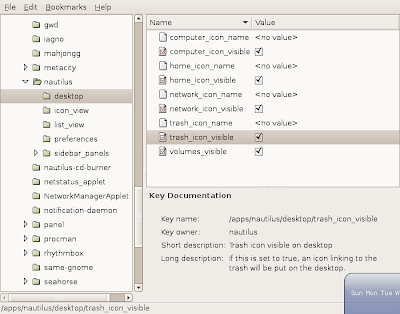
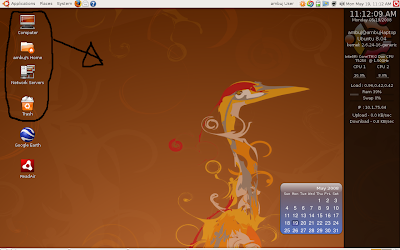 This is how my desktop looks , see the four icons on the top left of the screen :)
For Desktop on Linux Blog , http://linuxondesktop.blogspot.com
(C) 2008 , Ambuj Varshney
Subscribe to:
Posts (Atom)