Showing posts with label computer. Show all posts
Showing posts with label computer. Show all posts
Saturday, May 6, 2017
Did u or your friends computer infected by Antivirus XP 2008 malware
Did u or your friends computer infected by Antivirus XP 2008 malware
Here is the solution that I found in order to clean up this bloody shit "Antivirus XP 2008". You can manually clean it without the use of any antivirus or spyware removal software.
In my company, I saw few users computer affected by this malware too. To me I try to create a new user profile for the user that affected and once a new profile created for the specified user, it seems that "Antivirus XP 2008" program wont pop up during the startup and didnt show up later on too.
But I found this website that provide the manual clean up for this "Antivirus XP 2008" malware. You can click HERE to find out the details on how to remove it.
In my company, I saw few users computer affected by this malware too. To me I try to create a new user profile for the user that affected and once a new profile created for the specified user, it seems that "Antivirus XP 2008" program wont pop up during the startup and didnt show up later on too.
But I found this website that provide the manual clean up for this "Antivirus XP 2008" malware. You can click HERE to find out the details on how to remove it.
The symptom to show that your computer was affected by this malware is when you login to your computer, it will pop up once the windows start up. And it will then show you its scanning your computer and prove that your computer was affected by a list of trojan, malware and virus.
When you trying to use this "Antivirus XP 2008" program to clean up the list of detected virus, it will link you to a website and ask you to purchase it first before you can use it to clean up the viruses. A lot of normal user will being confuse and end up bought it and in the end also cant clean up the viruses. Its actually a fake antivirus program that trying to cheat consumer money. SO BEWARE OF THIS "Antivirus XP 2008"!

Friday, April 7, 2017
Displaying Trash Computer Home and Network icon on Ubuntu Desktop
Displaying Trash Computer Home and Network icon on Ubuntu Desktop
gconf-editor
First open the terminal window from (Applications -> Accessories -> Terminal ) and type in the following command to launch gconf-editor :
gconf-editor
You will get a window like this :
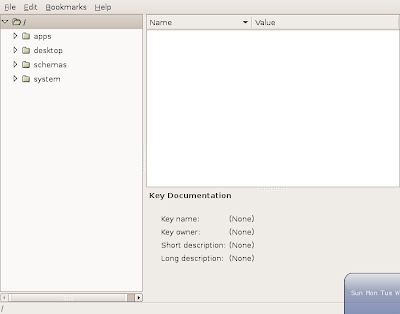
Now on the left side of the Pane in the window expand apps , inside apps expand nautilus and chose desktop (apps -> nautilus -> desktop )you will get a window like this :
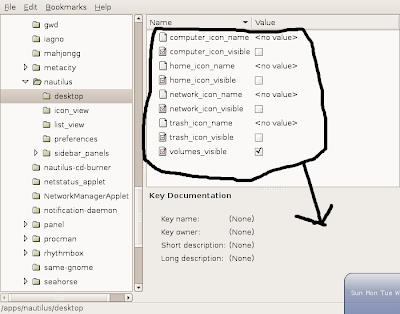 In this window enable "computer_icon_visible" , "home_icon_visible" , "network_icon_visible" and "trash_icon_visible" your window should look like this :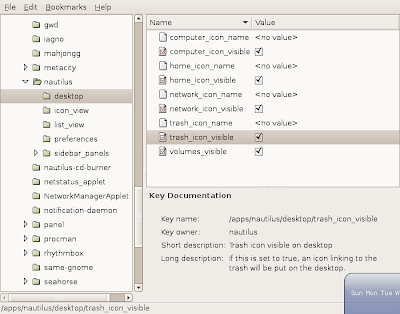
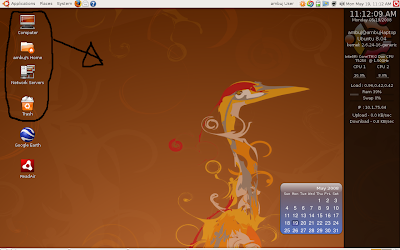 This is how my desktop looks , see the four icons on the top left of the screen :)
For Desktop on Linux Blog , http://linuxondesktop.blogspot.com
(C) 2008 , Ambuj Varshney
Subscribe to:
Posts (Atom)