Showing posts with label android. Show all posts
Showing posts with label android. Show all posts
Wednesday, July 12, 2017
Device ID APK Latest v1 3 2 Free Download For Android Devices
Device ID APK Latest v1 3 2 Free Download For Android Devices
Device ID APK Latest version free Download For Android devices
Device ID is awesome APK for all smart-phone and android devices and this famous App is developed by Evozi. Now this fabulous Apk assist you to know device ID of you tablet,smart-phone and android device. device id apk is very simple App first you can download this App on your android device then lunch it .Device ID will display the ID and some of information about your devices and this nice APK has more awesome and useful features which are as below .
Features of Device ID APK

- Device Id APK is free
- it can free and easily provide your device ID of your android devices
- Device ID assist you to your phone IMEI
- it can provide you to WiFi, Ethernet, and paired Bluetooth devices ID,s

Now you can free download this awesome APK on your devices from given link.the latest version1.3.2 of Device ID APK free download here
download from Google play store

Thursday, June 29, 2017
DicePlayer v1 9 6 Apk App for Android Download
DicePlayer v1 9 6 Apk App for Android Download
Requirements: Android 2.2+, Rooted phone
Overview: Diceplayer is a HW accelerated Media player for android. It use HW video decoder at various containers and audio codecs combination.
Dual Core/High end devices ( Sensation , Galaxy S/S2 , Nexus-S ) can play 720p MKV/AVI.
Diceplayer drains less bettery than SW based players.
Honeycomb tablets can play 720p MKV with Full HW accelerations.
If you use CM7 or unofficial ROMs that can not play MKV using default player, Diceplayer is the best solution.
Features
Formats
- AVI,MOV,MKV,FLV,AVI,3GP,3G2,ASF,WMV,MP4,M4V,TP,TS, MTP,M2T
Video Codecs
- HW : MPEG-4,H.264,H.263
- SW : MPEG-4,H.264,RMVB,XVID,MS MPEG-4,VP6,H.263,MPEG-1,MPEG-2
Audio Codecs
- DTS,AC3,AAC,Vorbis,FLAC,MP3,MP2,WMA
Subtitle format
- SSA,SMI,SRT,VOBSUB
- MKV subtitle extraction supported
- Unicode/Multibyte charset supported.
Transport
- HTTP
- RTP/RTSP
- HTTP Live Streaming with multiple bitrate
Supported devices
* Honeycomb tables(TF101,GT10.1,Iconia500) : 720p High@4.1 ( no weighted prediction )
* Samsung Galaxy S2 : 1080p H.264 high@5.1/MPEG-4,1080i AVCHD MTS
* Samsung Galaxy S and variants : 720p H.264 High@5.1
* Samsung Galaxy Tab(7) : 1080p H.264 High@5.1. 1080i have interlace artifacts.
* Samsung Galaxy Player (YP-GB1) : 720p H.264 High@5.1
* HTC Nexus-1,Desire and QSD8250 baesd devices : 720p H.264 High@3.1
=> May need libOmxVdec.so patch.
* HTC Sensation,Evo 4G+.Evo 3D : 720p High@5.1/1080p High@5.1(some 1080p files have shuttering)
* HTC Desire HD,ThunderBolt : 720p High@3.1/4.0(some Level 4.0 file have shutter problem)
* Toshiba TG-03 and many japaneses vendors QSD8250 baed devices : 720p H.264 High@3.1
=> May need libOmxVdec.so patch.
* Dell Streak,Venue : 720p H.264 High@3.1
=> May need libOmxVdec.so patch.
* SonyErricson Xperia Arc,Acro : 720p High@3.1/4.0(some Level 4.0 file have shutter problem)
* Motolora Defy : 720p capable but Gingerbread required.
* LG Optimus 2x,Moto Atrix : video capability depends on your firmware.
Limitations
* Video capability depends on your devices HW video decodes capability.
* Some devices(Moto Defy, Galaxy S/Tab) need gingerbread update.
* Tegra 2 based devices : H.264 High@4.1 ( no weighted prediction )
Whats in this version:
remove GET_TASK permission
minor bug fixes
Note:
1. Install Dice Player, Dont run
2. Install LuckyPatcher
3. Run the LuckyPatcher you need Root your phone, long press Dice Player, choose Remove License Verification (Auto!)
4. Enjoy
Download Instructions:
http://www.MegaShare.com/3998230
Mirror:
http://turbobit.net/ltv6tatdf9d5.html
http://ul.to/5vs94h3f

Overview: Diceplayer is a HW accelerated Media player for android. It use HW video decoder at various containers and audio codecs combination.
Dual Core/High end devices ( Sensation , Galaxy S/S2 , Nexus-S ) can play 720p MKV/AVI.
Diceplayer drains less bettery than SW based players.
Honeycomb tablets can play 720p MKV with Full HW accelerations.
If you use CM7 or unofficial ROMs that can not play MKV using default player, Diceplayer is the best solution.
Features
Formats
- AVI,MOV,MKV,FLV,AVI,3GP,3G2,ASF,WMV,MP4,M4V,TP,TS, MTP,M2T
Video Codecs
- HW : MPEG-4,H.264,H.263
- SW : MPEG-4,H.264,RMVB,XVID,MS MPEG-4,VP6,H.263,MPEG-1,MPEG-2
Audio Codecs
- DTS,AC3,AAC,Vorbis,FLAC,MP3,MP2,WMA
Subtitle format
- SSA,SMI,SRT,VOBSUB
- MKV subtitle extraction supported
- Unicode/Multibyte charset supported.
Transport
- HTTP
- RTP/RTSP
- HTTP Live Streaming with multiple bitrate
Supported devices
* Honeycomb tables(TF101,GT10.1,Iconia500) : 720p High@4.1 ( no weighted prediction )
* Samsung Galaxy S2 : 1080p H.264 high@5.1/MPEG-4,1080i AVCHD MTS
* Samsung Galaxy S and variants : 720p H.264 High@5.1
* Samsung Galaxy Tab(7) : 1080p H.264 High@5.1. 1080i have interlace artifacts.
* Samsung Galaxy Player (YP-GB1) : 720p H.264 High@5.1
* HTC Nexus-1,Desire and QSD8250 baesd devices : 720p H.264 High@3.1
=> May need libOmxVdec.so patch.
* HTC Sensation,Evo 4G+.Evo 3D : 720p High@5.1/1080p High@5.1(some 1080p files have shuttering)
* HTC Desire HD,ThunderBolt : 720p High@3.1/4.0(some Level 4.0 file have shutter problem)
* Toshiba TG-03 and many japaneses vendors QSD8250 baed devices : 720p H.264 High@3.1
=> May need libOmxVdec.so patch.
* Dell Streak,Venue : 720p H.264 High@3.1
=> May need libOmxVdec.so patch.
* SonyErricson Xperia Arc,Acro : 720p High@3.1/4.0(some Level 4.0 file have shutter problem)
* Motolora Defy : 720p capable but Gingerbread required.
* LG Optimus 2x,Moto Atrix : video capability depends on your firmware.
Limitations
* Video capability depends on your devices HW video decodes capability.
* Some devices(Moto Defy, Galaxy S/Tab) need gingerbread update.
* Tegra 2 based devices : H.264 High@4.1 ( no weighted prediction )
Whats in this version:
remove GET_TASK permission
minor bug fixes
Note:
1. Install Dice Player, Dont run
2. Install LuckyPatcher
3. Run the LuckyPatcher you need Root your phone, long press Dice Player, choose Remove License Verification (Auto!)
4. Enjoy
Download Instructions:
http://www.MegaShare.com/3998230
Mirror:
http://turbobit.net/ltv6tatdf9d5.html
http://ul.to/5vs94h3f
Sunday, June 25, 2017
Developers Can Now Bring Their Android Apps to Chrome OS
Developers Can Now Bring Their Android Apps to Chrome OS

Testing our own app with Google�s �ARC Welder� tool
Last year Google slowly began bringing select Android apps to the Chrome Web Store, allowing a batch of useful mobile apps to run on Chromebooks and other Chrome devices.
Android applications run on Chrome OS through a native client extension called �App Runtime for Chrome�, more commonly known as �ARC�, which runs Android codes at near-native speed through a sandboxed Dalvik VM.
In the months following the announcement of ARC over thirty Android apps have been added to the Web Store, including productivity powerhouse Evernote, PDF mark-up tool iAnnotate and social media fave Vine.
Some Chrome users have grown a little impatient at the slow rate of porting more desirable apps over (think Flipboard, VLC, Skype, etc) despite many lesser known utilities and educational tools wrangling their into the Web Store.
Today that changes.
ARC Opens To All
At its press event Google confirmed it plans to open the ARC programme to all Android developers, not just a select few. This means developers themselves can now dive in to test their Android app in Chrome against the ARC plugin to see what works and make changes, like adding support for keyboard tab keys and mouse input, as needed.
Finally, if all works as intended, they are free to promptly publish it to the Chrome Web Store for users to enjoy.
And there�s you thinking it was all new convertible Chromebooks and low-cost Chromebits announced!
In unlocking the flood gates for Android app developers to bring their wares to Chrome OS Google risks seeing developers shun native Chrome Apps (written in web technologies, running offline, leveraging system hardware APIs, etc) in favour of lazy ports.
Similarly, with a big focus due on Service Workers, its plan to app-ify websites with offline and push messaging features, the need for a bona-fide �Web App� is also lessened.
But whatever mess it makes for a consistent developer story it does, for now, mean more apps for users, more opportunities for developers, and more momentum for the Chrome project.

How To Test Android Apps for Chrome Using ARC Welder
The official Chrome developer documentation details the full recommended way for Android devs to get started with ARC.
In short, developers need three things:
- An APK of the application they wish to test
- A PC, Mac or Chromebook running Chrome v40 or later
- The ARC Welder app from the Chrome Web Store
Installing the ARC Welder app from the Web Store also downloads ARC plugin itself (even on Windows, Mac or Linux). Since the plugin is more than 100MB in size eager mobile devs should only install it when not on a metered, cellular or slow connection.
Once up and running the ARC Welder app simplifies the entire process;
- Open ARC Welder
- Add .apk
- Set configuration values (layout, orientation, etc)
- Test
Google say developers should strive to ensure that an app works well for touch and non-touch Chromebooks, should ideally test on the Chrome OS Stable Channel and cautions that the plugin does not yet support all of Google Play Services yet.
ARC Welder allows .apk files to be quickly exported into a .zip file for easy submission to the Chrome Web Store.
Thursday, June 15, 2017
Die beste Android TV Box 2016 NVIDIA Shield TV Android
Die beste Android TV Box 2016 NVIDIA Shield TV Android

Ich muss aber auch gleichzeitig warnen, dass das nur der Fall ist, wenn man auf Garantie verzichten kann bzw. ich bin mir noch nicht einmal ganz sicher, ob die Garantie erlischt aber es soll gleich zu Beginn eine Warnung f�r alle sein, die sich mit dem Gedanken nicht anfreunden k�nnen.
Au�erdem kommt es auf das Einsatzgebiet an! Ich habe keinerlei Interesse Spiele zu streamen! Die Shield soll mir als Mediabox dienen - Filme �ber Datentr�ger abspielen, Internetradio, Streams, Emulatoren f�r Spiele, Android-Spiele, usw. usf.
Damals hat eine neue Box aus China etwa 70� gekostet, da 100$ �blich waren, was umgerechnet etwa 60� sind bzw. waren und mit 19% hat der ganze Spa� mit DHL rund 70� gekostet. Heute sieht das ganze anders aus... die Preise sind gestiegen, der Dollar ist st�rker bzw. der Euro schw�cher, DHL will auch rund 12� von uns haben und mit 19% kommen wir auf rund 120�. Wenn ich jetzt mal bei meinem China-H�ndler vorbei schaue, dann kann ich etwa mit 150$ nur f�r das Ger�t rechnen, was das ganze sinnlos macht, da ich f�r 200� mir bereits hier einen (mini) Rechner kaufen kann (beispielsweise Intel NUC).


Die Shield ist sehr hochwertig, selbst beim Zubeh�r kann man nichts schlechtes sagen, die W�rmeentwicklung h�lt sich in Grenzen, Abmessungen gefallen mir sehr, da ich die Shield sogar unter dem TV-Tisch schieben k�nnte und der ganz gro�e Pluspunkt ist die Community!
 |
| NVIDIA Shield TV mit Custom ROM und Nova Launcher |


Wer mit dem Gedanken spielen sollte den gleichen Weg zu gehen, hier eine kurze Installationsanleitung, wie Ihr die Custom ROM installieren k�nnt.
Anleitung auf eigene Gefahr! Mit dem Flashen einer Custom-ROM/einem Custom-Recovery/entsperren des Bootloaders verliert Ihr die Garantie und Gew�hrleistung auf euer Ger�t! Weder ich, noch sonst irgendwer �bernehmen eine Haftung, f�r irgendwelche Sch�den, die durch das befolgen dieser Anleitung geschehen!
Die Custom ROM k�nnt Ihr bei XDA herunterladen. Ich verwende Version 1.1 von zulu99 (externe Link). Dort findet Ihr auch ein Video, welches euch erkl�rt, wie das ganze am Ende aussieht (auch wenn es von Version 1.0 ist).


MicroUSB-Kabel mit Rechner und der Shield verbinden.

Sobald der Befehl adb devices ausgef�hrt wird, erscheint eine RSA-Abfrage auf der Shield TV.

Hier dann einen Haken setzen (Von diesem Computer immer zulassen) und mit OK best�tigen, dann den Befehl adb devices wieder ausf�hren und wie im vorletzten Bild sollte dort jetzt eine Zahlenkombination und device dahinter stehen. Ist das der Fall, dann mit adb reboot bootloader weiter machen. Die Shield wird einen Neustart durchf�hren.
Die Shield startet nicht wie gewohnt neu und sollte das der Fall sein, dann einfach im Terminal weiter machen und erst einmal das neue unbekannte Bild ignorieren.

Mit dem Knopf auf der Shield (vorder Seite) m�sst Ihr das neu erschienen Bild best�tigen und bei der 16 GB Version etwa 5 Minuten warten, da dieses formatiert wird. Die Shield wird dann einen Neustart durchf�hren und sollte das nicht passieren, obwohl es wie im Bild oben mit Finished best�tigt wurde, dann den Befehl fastboot reboot durchf�hren (war bei mir nicht notwendig).
Nach dem Neustart wurden alle Dateien gel�scht und somit auch die Shield TV zur�ckgesetzt. Jetzt m�sst Ihr Debugging wieder aktivieren und die Shield wieder mit dem Befehl adb reboot bootloader neu starten - wie wir es zu Beginn getan haben.


Als ich zu Hause war, habe ich �berpr�ft, ob die NVIDIA Shield TV mit Linux verbunden wird.
Ihr k�nnt die selben Befehl verwenden, wie f�r Windows, nur m�sst Ihr zu Beginn dies beachten:

Schlie�t diese deshalb erst einmal an und f�hrt den Befehl lsusb aus.

F�r uns sind die ersten beiden Zahlen nach dem ID wichtig.


SUBSYSTEM=="usb", ATTR{idVendor}=="18d1", MODE="0666", GROUP="plugdev"
SUBSYSTEM=="usb", ATTR{idVendor}=="18d1", ATTR{idProduct}=="4ee7", SYMLINK+="android_adb"
SUBSYSTEM=="usb", ATTR{idVendor}=="18d1", ATTR{idProduct}=="4ee7", SYMLINK+="android_fastboot"
STRG gedr�ckt halten und O dr�cken, dies mit Entertaste best�tigen, dann wieder STRG gedr�ckt halten und mit X das Fenster schlie�en.
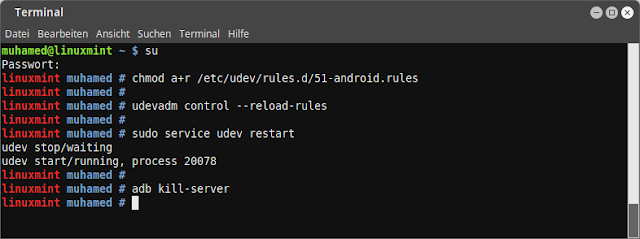
[1] chmod a+r /etc/udev/rules.d/51-android.rules
[2] udevadm control --reload-rules
[3] sudo service udev restart
[4] adb kill-server

Mit der Firmware ist es f�r mich die beste Android Box 2016. Dabei bleiben auch die gute Funktionen erhalten, wie zum Beispiel diese:


Netflix ist zwar nicht installiert aber kann dann ohne Probleme als APK oder direkt im Google Play geladen werden. Es gibt auch eine 4K Version, welche Ihr im Internet finden k�nnt, damit auch voll und ganz 4K unterst�tzt werden.
Das einzigste Negative w�re das Gamepad! Dieses funktioniert nur noch �ber Kabel und nicht mehr kabellos. Die Fernbedienung besitze ich nicht, deshalb kann ich dazu auch nichts sagen. Mich st�rt das nicht, da ich sowieso eigenes Zubeh�r habe und auch das Gamepad von Xiaomi verwende, welches dank Bluetooth problemlos kabellos genutzt werden kann.

Sollte jemand Fragen haben, dann stellt diese einfach.
Thursday, June 1, 2017
Developer Preview of Android O
Developer Preview of Android O

read more: Android Developers Blog - O-MG, the Developer Preview of Android O is here!
Wednesday, May 17, 2017
Diner Dash v1 4 10 Unlimited Coins Cash Android
Diner Dash v1 4 10 Unlimited Coins Cash Android
Android Games Torrents
<[ ?_? ]>
Download Diner Dash v1.4.10 [Unlimited Coins/Cash] Android![Download Diner Dash v1.4.10 [Unlimited Coins/Cash] Android](https://blogger.googleusercontent.com/img/b/R29vZ2xl/AVvXsEhXwiOP19OUlXbtefzyBc1M897GQ-f0FIslYhQi5jP_-Ty5C3g2GGI70Fj0bZE1apxwzqZQQLZchw-S6_aUNX7ehqbOm8Hrhozwhg4C2tj8FBB0eQgSefobwNPqTfGH0dzyVRGYNp6Pfect/s1600/1wi2ZlFl.jpg "Download Diner Dash v1.4.10 [Unlimited Coins/Cash] Android")
Description
Diner Dash v1.4.10 [Unlimited Coins/Cash]
Requirements: 3.0+
Overview: In addition to being freemium, the new Diner Dash has a new visual style and introduces new customers, new helpers, new upgrades, social gaming features, and other enhancements.
�� there�s something heroic � superhuman, even � about a waitress who darts from table to table, takes orders, serves food, cleans up, deals with belligerent customers, and keeps her composure through all of it.� � Gamezebo
�Everything is stylish, smooth, and all of the different customer types have abundant personality�� � 148Apps
Flo�s back in the biggest Diner Dash game ever�the latest and greatest in the world�s #1 hit time management casual game series!
Roll up your sleeves for the breakfast, lunch, and dinner shifts, because Flo needs your help. By providing speedy service and delicious food, please customers and earn big tips to keep the town�s diners in business and fend off Mr. Big�s brigade of Eat-Mor fast food restaurants!
FRESH & FAST-PACED GAMEPLAY!
Strategically seat, serve, and satisfy customers from breakfast through dinner to earn tips and big rewards! Cater to each customer�s unique food requests, casual to outrageous, while overcoming new challenges from VIPs and troublemakers alike!
ACTION-PACKED LEVELS!
Play 150+ levels across three unique diners with more levels, restaurants and characters to come!
QUIRKY NEW CUSTOMERS!
Keep tabs on over 20 customers with distinctive personalities and demands like the anti-social Hennui who needs to cheer up before sitting down, or the nefarious cheapskate Skip wholl dine-and-dash on any dinner possible! Pay special attention to VIP characters from food critics to movie stars, and earn rare rewards!
STATE-OF-THE-ART UPGRADES & POWERFUL BOOSTS!
Upgrade your diner with helpers like Moppo to clean super-sized messes, and high tech appliances to help Cookie prepare food faster than ever! Use valuable boosts to amp up your speed and abilities to fly through the breakfast, lunch, and dinner shifts!
GET SOCIAL & PLAY WITH FRIENDS!
Connect with your friends through social networks to help each other succeed by sending gifts, or compare progress to see who�s ahead! It�s you and your friends against Mr. Big and his army of fast food restaurants!
High-end, immersive tablet gameplay!
Whats New
Check out the latest Diner Dash update!
� New hats with amazing benefits have been added to the Mystery Boxes and the Store!
� Be on the lookout for several exciting new events!
� The Continue System has been improved based on your feedback.
� Bug fixes and other improvements to game performance.
This app has no advertisements
_________________________
? Download Diner Dash v1.4.10 [Unlimited Coins/Cash] Android Torrent By :
WindowsGame.org >> Android Games Torrents
? Diner Dash v1.4.10 [Unlimited Coins/Cash] Android
- com_playfirst_dinerdashx-1411.apk : 32.7 MB
( Size : 32.7 MB )
-
How To Download
____________________
Download Full Game Torrent
![Download Diner Dash v1.4.10 [Unlimited Coins/Cash] Android Torrent](https://blogger.googleusercontent.com/img/b/R29vZ2xl/AVvXsEjwDwhyphenhyphenQQpOeUAICrRluULVyPWVdu3hdA2BGCSR7MDrnqF34gH1Q6Tt1dF05yX64u_d2V464gzTVtdEPI0CDMGDKy85h5tbM6tLpqcq_LIEoUs4J9GOw59BhP8o-gTdDV8SxtVmvx-ZLyg/s1600/Download-Button.png "Download Diner Dash v1.4.10 [Unlimited Coins/Cash] Android Torrent")
____________________
Download Full Game Torrent
________________________________
>> Android Games Torrents <[ ?_? ]>
________________________________
Sunday, May 14, 2017
Diner Dash 2 v1 4 4 1 4 4 Android Game Apk Latest Released Updated Try it now
Diner Dash 2 v1 4 4 1 4 4 Android Game Apk Latest Released Updated Try it now

Follow Us:
Facebook.com/glumobile
Twitter @GluMobile
Search Keywords: PlayFirst, Glu Games, Glu Mobile, Diner Dash, DD2, Time Management, Online, PC, Flo, Diner, Food, Social, Hit
Download Qr Barcode Scanner Android Application
Android Market
1. Open Android Market on Your phone
2. Go to "Search" or click here
3. And download the game
for free from android market

����
Free or Paid Version
Download Diner Dash 2 for your Android phone
Not Available Try Other
Way of download

����
Barcode Download
1. Open your preferred Barcode scanner software (Do not have barcode app? Get one here).
2. Point your phone camera at the QR code below and scan it.
3. Follow the onscreen instructions to proceed with the installation.

Subscribe to:
Posts (Atom)